Sunday, November 20, 2011

Thailand floods have NetApp treading water

Thailand has recently had it's worst flooding in decades. This flooding is slowing the production of hard drives and storage at an alarming rate. They are producing about a fifth of what they should have been at and by this time. Thailand produces about 45% of the entire worlds HDD supplies by companies like Seagate, Toshiba, and Western Digital. Shortages are expected to continue on into 2012. The shortages of hard drives will affect everyone. Because of the shortages in the early of 2012 the production of laptops and smaller drives will be mostly affected according to TechTarget.com. I think that is obvious now and a no-brainer that half of the entire worlds supplies for ANYTHING should not be in one single location. If not for any other reason then just because of the simple fact that stuff happens. No one could have envisioned and impact this large due to flooding. Even if they had then who says there is anything that could have been done about it. The operations need to be split up into different geographic locations. I am sure that one of the reasons they are remaining there in Thailand is because of low costs but something has to give. We are at a place in the technology world that things are changing at a rapid pace. If anything slows down then it can and will have an enormous impact on how fast technology as a whole can and will grow. In the last 10 years alone Apple has gone from simple little Macs in classrooms that students hated for everything but simple games. To the new standard for premium computing. If one of the Apple manufacturers was to go through something and halt the production of iPods when they first blew up Apple would have lost a lot of money. A TON! of money. All in all at the end of the day they should not have half of anything that big in any single location.


Here is a link to the article that I read for this Blog http://itknowledgeexchange.techtarget.com/storage-soup/thailand-floods-have-netapp-treading-water/

Sunday, November 13, 2011

Network/Storage Virtualization

 http://www.cisco.com/assets/cdc_content_elements/images/netsol/ent/srvc-orntd_ntwrk_archmod_lg.jpg
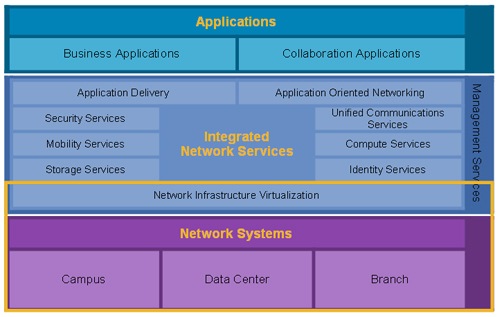
In Network Virtualization many of the client/server based services are put onto the same network. With Network Virtualization as many parts of a network are made “Virtual”as possible. This means that many services are automated and others are made to be controlled remotely. Cisco is the big fish in this department with 3Com coming in second place when it comes to size. Cisco uses switches and routers to perform services like security, storage, VoIP, mobility, and application delivery. All of these services are very important to large businesses and small businesses as well. Network Virtualization minimizes the work that must be done by people. This in turn also reduces the number of people that service companies like Cisco needs to hire for this particular position. Network Virtualization is an all around money saver and it is also more efficient.

When it comes to Storage Virtualization the easiest way to understand it would be if there were 7 cranes at a construction site and the cranes represented storage devices. Storage virtualization would be the equivalent to having one main control center that could operate all 7 cranes simultaneously. This control center would be able to perform the tasks of backup, archiving, and recovery more easily and faster than if they used different programs or methods of doing each. EMC offers Network-based storage virtualization and that features Dynamic volume mobility, Centralized volume management, processing power, Streamlined operation, and Heterogeneous point-in-time copies(clones). As a whole the benefits of EMC Invista are that they move volumes across heterogenous storage, without disruption, allocate and reallocate storage resources from one interface, they allow you to use EMC Invista to perform I/O redirection and other virtualization tasks at wire speed, they simplify volume presentation and management and storage allocation in your heterogenous SANs and they reduce the cost and complexity of creating point-in-time copies across different storage arrays.(http://www.emc.com/products/detail/software/invista.htm)

Sunday, November 6, 2011

Backup and Recovery


Backup and Recovery are 2 very important aspects of companies that require data storage. At the EMC sites in North Carolina they went in depth about their services. EMC has very cost effective resources and provides both services to their customers. Backup is very important when it comes to businesses because they need to make sure that their data and information is always in existence. If something happens on site at a company, let's say Company A for example then they need that data to be backed up at another location. If Company A catches on fire and everything is lost in the fire companies like EMC make sure that the data is safe and intact at one of their many backup locations. Ok so back to the analogy, say the place goes up in flames and all is lost. The first move will be to either rebuild there or find a new location. After that is done they will need that information to be recovered. This is where the recovery part of Backup and Recovery comes in. Company A has already spent time rebuilding and basically preparing to continue their business and now they need their data to be recovered. The data storage company, in this case EMC can send the data to Company A wirelessly and at a very high speed. This ensures that the company can get their data without wasting time and money. Everyday people like myself don’t need a huge company like EMC to help me back up my data. In comparison to these bigger companies I have very little data anyway. In my own life I use external hard drives. These can run anywhere from $50-$200 depending on the size of hard drive and it’s features. Personally I don’t like external hard drives that need to be plugged into the wall as well as your computer. How do I know this you might ask? The answer is because I have one. I use my Western Digital external hard drive more often because I do not have to plug it into the wall. As far as backup and recovery goes in my case. I can back up my entire computer to an external hard drive and mail it home to NY. Should anything happen to my laptop I could send for that hard drive and restore all of my data. When it comes to backing up my things daily. That would prove to be a little more difficult. Actually I’ll be honest, anything short of getting a membership to some website I haven’t the slightest clue.

Here are a couple links that can and will provide more knowledge on this subject.

Thanks For Reading!

http://www.emc.com/collateral/analyst-reports/11530-idc-ww-pbba-2011-2015-forecast.pdf
http://www.emc.com/products/category/backup-recovery.htm
http://www.barraguard.com/Network-Backup-Servers.asp?source=google&keyword=backup-and-recovery&gclid=COqMgpDeo6wCFYxV7AodEHbJKA