Sunday, November 20, 2011

Thailand floods have NetApp treading water

Thailand has recently had it's worst flooding in decades. This flooding is slowing the production of hard drives and storage at an alarming rate. They are producing about a fifth of what they should have been at and by this time. Thailand produces about 45% of the entire worlds HDD supplies by companies like Seagate, Toshiba, and Western Digital. Shortages are expected to continue on into 2012. The shortages of hard drives will affect everyone. Because of the shortages in the early of 2012 the production of laptops and smaller drives will be mostly affected according to TechTarget.com. I think that is obvious now and a no-brainer that half of the entire worlds supplies for ANYTHING should not be in one single location. If not for any other reason then just because of the simple fact that stuff happens. No one could have envisioned and impact this large due to flooding. Even if they had then who says there is anything that could have been done about it. The operations need to be split up into different geographic locations. I am sure that one of the reasons they are remaining there in Thailand is because of low costs but something has to give. We are at a place in the technology world that things are changing at a rapid pace. If anything slows down then it can and will have an enormous impact on how fast technology as a whole can and will grow. In the last 10 years alone Apple has gone from simple little Macs in classrooms that students hated for everything but simple games. To the new standard for premium computing. If one of the Apple manufacturers was to go through something and halt the production of iPods when they first blew up Apple would have lost a lot of money. A TON! of money. All in all at the end of the day they should not have half of anything that big in any single location.


Here is a link to the article that I read for this Blog http://itknowledgeexchange.techtarget.com/storage-soup/thailand-floods-have-netapp-treading-water/

Sunday, November 13, 2011

Network/Storage Virtualization

 http://www.cisco.com/assets/cdc_content_elements/images/netsol/ent/srvc-orntd_ntwrk_archmod_lg.jpg
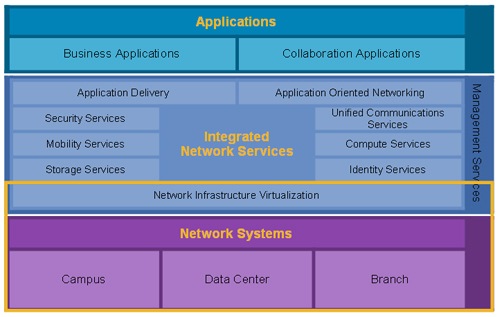
In Network Virtualization many of the client/server based services are put onto the same network. With Network Virtualization as many parts of a network are made “Virtual”as possible. This means that many services are automated and others are made to be controlled remotely. Cisco is the big fish in this department with 3Com coming in second place when it comes to size. Cisco uses switches and routers to perform services like security, storage, VoIP, mobility, and application delivery. All of these services are very important to large businesses and small businesses as well. Network Virtualization minimizes the work that must be done by people. This in turn also reduces the number of people that service companies like Cisco needs to hire for this particular position. Network Virtualization is an all around money saver and it is also more efficient.

When it comes to Storage Virtualization the easiest way to understand it would be if there were 7 cranes at a construction site and the cranes represented storage devices. Storage virtualization would be the equivalent to having one main control center that could operate all 7 cranes simultaneously. This control center would be able to perform the tasks of backup, archiving, and recovery more easily and faster than if they used different programs or methods of doing each. EMC offers Network-based storage virtualization and that features Dynamic volume mobility, Centralized volume management, processing power, Streamlined operation, and Heterogeneous point-in-time copies(clones). As a whole the benefits of EMC Invista are that they move volumes across heterogenous storage, without disruption, allocate and reallocate storage resources from one interface, they allow you to use EMC Invista to perform I/O redirection and other virtualization tasks at wire speed, they simplify volume presentation and management and storage allocation in your heterogenous SANs and they reduce the cost and complexity of creating point-in-time copies across different storage arrays.(http://www.emc.com/products/detail/software/invista.htm)

Sunday, November 6, 2011

Backup and Recovery


Backup and Recovery are 2 very important aspects of companies that require data storage. At the EMC sites in North Carolina they went in depth about their services. EMC has very cost effective resources and provides both services to their customers. Backup is very important when it comes to businesses because they need to make sure that their data and information is always in existence. If something happens on site at a company, let's say Company A for example then they need that data to be backed up at another location. If Company A catches on fire and everything is lost in the fire companies like EMC make sure that the data is safe and intact at one of their many backup locations. Ok so back to the analogy, say the place goes up in flames and all is lost. The first move will be to either rebuild there or find a new location. After that is done they will need that information to be recovered. This is where the recovery part of Backup and Recovery comes in. Company A has already spent time rebuilding and basically preparing to continue their business and now they need their data to be recovered. The data storage company, in this case EMC can send the data to Company A wirelessly and at a very high speed. This ensures that the company can get their data without wasting time and money. Everyday people like myself don’t need a huge company like EMC to help me back up my data. In comparison to these bigger companies I have very little data anyway. In my own life I use external hard drives. These can run anywhere from $50-$200 depending on the size of hard drive and it’s features. Personally I don’t like external hard drives that need to be plugged into the wall as well as your computer. How do I know this you might ask? The answer is because I have one. I use my Western Digital external hard drive more often because I do not have to plug it into the wall. As far as backup and recovery goes in my case. I can back up my entire computer to an external hard drive and mail it home to NY. Should anything happen to my laptop I could send for that hard drive and restore all of my data. When it comes to backing up my things daily. That would prove to be a little more difficult. Actually I’ll be honest, anything short of getting a membership to some website I haven’t the slightest clue.

Here are a couple links that can and will provide more knowledge on this subject.

Thanks For Reading!

http://www.emc.com/collateral/analyst-reports/11530-idc-ww-pbba-2011-2015-forecast.pdf
http://www.emc.com/products/category/backup-recovery.htm
http://www.barraguard.com/Network-Backup-Servers.asp?source=google&keyword=backup-and-recovery&gclid=COqMgpDeo6wCFYxV7AodEHbJKA

Sunday, October 30, 2011

EMC Storage Technology Company


On Friday October 28th, 2011 I went to EMC with a few professors and some other students. While at EMC we were able to tour their kind of storage facility of their personal warehouse and  in a way their factory. After that we went to see their functioning storage facility and testing facility. They have an entire facility/room designated solely to testing. They spend tons of money daily to continuously test their equipment and make sure that it works and is backward compatible. By doing this they can maintain their level of professionalism and credibility. EMC has 25% of their target market and their closest competitor only has 15% so they are far ahead of the pack when it comes to their industry. EMC is located in North Carolina about an hour from North Carolina A&T State University. The faculty and staff were extremely knowledgable about everything happening around them and were really on top of everything. In the warehouse there were people working there that were not actual employees of EMC but they were contracted through another company so that EMC could have exactly as many employees as necessary at any given time rather than having a lot on payroll and wasting money. When we toured the facilities they went in depth as to why they did certain things. For instance their floors are 3 feet off the actual ground to allow cooled air to flow through the floors and keep the equipment cool and running at the best possible pace and rate. A lot goes into making sure that the facility is in peak condition to maintain the hardware. When clients come to EMC they can tour the facility and see where their information will be stored, what kind of security there is on the building and things like that. Overall the experience was phenomenal and I am extremely glad that I went.

Sunday, October 23, 2011

Thurgood Marshall College Fund


I am currently in New York City with the Thurgood Marshall College Fund for the annual Thurgood Marshall Leadership Conference. Here I am learning a lot about what it will take for me to become successful after college and in my field of IT as well. I have used this time and opportunity to talk and network with various company representatives and actually asked them what would be expected of me if I were to obtain a job with their company in my field. They had very good answers and were very educational as well. The main thing that employers of IT employees focus on is your technical skills. Not how you are dressed, not what you look like, but if you can do your job. That is it in a nut shell. When it comes to other jobs like sales and other things like if you are going to be the face of the company then soft skills are very necessary but in my case I wont be reporting to work in a suit or even slacks. Some people even told me that they come to work in jeans and sneakers sometimes. This leadership conference has been extremely educational for me and I am extremely privileged to be here. I think that if there were any justifiable reasons to miss class then this is definitely one of them. Tomorrow morning will be a job fair where I will get another chance to talk and network with employers and I am extremely excited about that. These employers are among the top in the world. They include Wal-Mart, AT&T, Atria and 30+ others. The employers are extremely receptive and interested in talking to us as students and that is mind blowing and so exciting to be around so many big name people and among all black students. I am having an excellent time and learning a lot.

Friday, October 21, 2011

Open Source Licensing

Open Source Licensing is basically when someone is granted permission to alter existing software. The easiest way to explain it would be to a drivers license. If you learn how to drive a car(code programs) that is fine and no one can stop you from learning that. If you want to drive a government approved car on public roads however(alter existing software) then you need a license from the government(the author of that software) to do so. A great deal of open source licenses give you the ability to alter the software for personal use, however a few big name ones actually let you alter them and actually assist them with feedback. Mozilla Firefox and Linux are notorious for this. Acquiring an open source license can be beneficial to you if you are new to coding. If you have just begun and aren’t familiar with exactly how to do various things like start the code, then acquiring an existing and functioning one can be extremely beneficial. As students in our current generation we are a lot more technologically advanced than a lot of older people. This can actually make us an asset to them when it comes to their software. Personally I am very proficient at Adobe Photoshop and I have never taken a single class teaching me anything about Photoshop. I have been using it along with tutorials myself and learned from friends. This is an example of how formal education or age can be irrelevant when it comes to technology. Open source licensing makes it easier and legal for people like you and I to learn or assist existing programming teams all over the world, often for free. Open source licensing is often unrestricted access to the software code as well, this allows it to be altered and changed around without limits at little to no cost to whoever wants to do it.

Sunday, October 9, 2011

The Cloud...again


I have a previous blog that is geared completely toward "The Cloud." This one is going to be a little different. I am gearing this one toward cloud security. First and foremost, some things should not be uploaded to the internet under any circumstances. There is no absolute fool proof mechanism when it comes to protecting your data. If you happen to leave your account logged into a computer and walk away then anyone in the vicinity could easily download or email themselves some or all of your files. Cloud security really comes down to you as an individual. You have to be very careful when it comes to sharing your data as well. If you upload a file to the cloud and send someone a link to retrieve it themselves then that is fine. One thing to remember is that anyone with that direct link to your file can usually download it. So if you choose to upload a file for a purpose it would be a good idea to delete it and remove it from the internet as soon as possible after it's purpose has been served. Personally I have my resume on a few of my cloud networks and that's pretty much it. On other various sites I have pictures I have created in photoshop so that I can always access my work and show people what I have done. These things aren't too bad if they fall into the wrong hands. Other things like digital copies of your ID or your social security number should not be uploaded to any cloud anywhere, EVER. When files or information is uploaded to the cloud another issue is that your data can be hacked from anywhere. If you have a safe in your house then for someone to get what's inside at least they have to first gain access to your house. With the cloud hackers can work day and night on gaining access to your information. There are just a few aspects to cloud technology as far as security goes, I hope it was helpful to everyone.

Sunday, October 2, 2011

A Day Without Cell Phone and Internet Access.

http://techtips.salon.com/DM-Resize/photos.demandstudios.com/getty/article/178/206/89654445.jpg?w=600&h=600&keep_ratio=1I could only imagine what it would be like to be "unplugged" as they say. I would like to do that at some point in my life but it has gotten to the point that I really kind of have to be connected at some point of every day. My girlfriend is studying abroad in South Korea and the only way to keep in touch especially because of the time difference is for her to text my cellphone from her computer. If I was unavailable then she might wonder what happened or something of that nature. I use the internet for all kinds of things every day as well, right now I am using it to complete this assignment for class and if I didn't do so then I would be out of an assignment grade since my professor doesn't accept late work under any circumstances. My mother also lives in Panama and the main way we keep in touch is via Skype or Gmail chat both of which utilize the wonderful services of the internet. I would feel extremely awkward without my cellphone, especially since I don’t do much besides go to work and class and go to my apartment. It would make my already boring life about 10 times more boring. I think that the internet and convenience of a cell phone are definitely abused to an extent but I also believe that they are somewhat necessary in today's society. I can remember when I didn’t have internet access at my house and I didn’t have a cellphone. I went outside a lot more and I spent more time with my cousins and family. Now I am in college though and I am constantly on the move and without the internet and my cellphone I would probably go weeks if not longer without talking to my family and that wouldn’t be a good feeling.

Sunday, September 25, 2011

RAID, RAID, RAID, you just can't get enough.


When I first heard about RAID technology in my IT 305 class I didn’t know what to think at all. It was somewhat of a in one ear out the other kind of thing to me since it was extremely boring. After a couple weeks I actually began reading and started to understand it somewhat. RAID stands for Redundant Array of Independent Disks. The purpose of RAID is to improve the functionality and cost of storing your data. There are 6 different kinds of RAID not including Nested which is combinations of different kinds. The different kinds and a little description are,

RAID 0     Striped array with no fault tolerance
RAID 1     Disk mirroring
RAID 3     parallel access arrays with dedicated parity disk
RAID 4     Striped array with independent disks and a dedicated parity disk
RAID 5     Striped array with independent disks and distributed parity
RAID 6     Striped array with independent disks and dual distributed parity
Nested       Combinations of RAID levels. Example: RAID 1 + RAID 0

There are different positives and negatives to using each kind of RAID. There are also minimum requirements, kind of like when installing certain software on a computer, sometimes you may not have enough RAM and the program will not install. Same thing with RAID, if you do not have the minimum requirements then you will not be able to implement that particular kind.

RAID 0 is the cheapest form to use and it requires a minimum of 2 disks. It has a storage efficiency of 100%( which is pretty high in my opinion) and it has a very good Read and Write performance with no penalty.

RAID 1 has a high cost & it requires a minimum of 2 disks. It has a storage efficiency of 50%.( not looking so good) The Read and Write performance is good and the write penalty is moderate.

RAID 3 has a moderate cost and requires a minimum of 3 disks. The storage efficiency of it depends on how many disks are used, the higher the number the lower the efficiency. It is good for random reads and very good for sequential reads. It is poor to fair for small random writes and good for large sequential writes, the write penalty is high.

RAID 4 has a moderate cost as well and again it has a minimum of 3 disks required. The storage efficiency is dependent on the number of disks, the higher the number of disks the less efficient the storage. It is very good for random reads and good to very good for sequential writes. It is poor to fair for random writes and fair to good for sequential writes. RAID 4 also has a high write penalty.

RAID 5 has a moderate cost and needs a minimum of 3 disks. The storage efficiency depends on the number of disks, more disks are less efficient. The read performance is very good for random reads and good for sequential reads. The write performance is fair for random writes, it is slower due to parity overhead and it is fair to good for sequential writes. RAID 5 has a high write penalty.

RAID 6 has a moderate cost but it is more than RAID 5. Its storage efficiency is the lowest out of all of them and it has the highest write penalty.(ok now for some good news) The positives of RAID 6 are that it is very good for random reads and good for sequential reads as well. It is good for small random writes as well (remember it has a very high write penalty so you don’t want to be doing a lot of that.)

To wrap things up different RAID is better for different tasks and depending on what you plan on doing with or to your data you should plan accordingly if you choose to implement RAID or else you might as well not have done it.

Sunday, September 18, 2011

Firefox is the BEST!!!

Have you ever heard of Firefox? Of course you have, who hasn't? It's the most popular internet browser, it's fast, it's efficient, you can do your Blackboard homework, quizzes, and exams on it and to top it all off, it's free. If you made Firefox would you try to capitalize on it? Maybe charge $4.99 per download? Possibly. Part of the reason Firefox is so good at what it does is because it is open source. Mozilla is open to suggestions and full fledged help from everyday people that have knowledge on the subject. Since Firefox is open source if you are a programmer or know how to tweak programs or write them then you could download a special version of Firefox and alter it to your liking for your own personal use. Firefox is one of the leading internet browsers out right now. It is an extremely stable browser even though it has not been around as long as it’s closest contender Internet Explorer. For some odd reason Internet Explorer can’t manage to get rid of all of it’s bugs and crashes and will inexplicably quit among other things. Firefox does not have that problem, at least not as often anyways. Firefox is actually recommended by professors at my college. They tell students to use Firefox when taking exams because it is guaranteed that all of Blackboards buttons and configurations will be recognized. Firefox makes everything easier for me, if I want to share pictures with my friends then I can simply right-click and select “copy image location” and the direct URL to the image will be copied to my clipboard for sharing. In other browsers that is not always an option. The absolute best part of Firefox has to be without a doubt, the plug-ins! At one time I actually had a plug-in that cloaked my IP address, I had one that allowed me to use Twitter as I surfed the web, and you can even get media players so that you can control your music via Firefox. All in all Firefox is an extremely good browser and because it is open source it is constantly being updated and improved keep an eye on it and if you don’t use it yet I’m sure you will convert sooner rather than later. Here's a link to download it now if you like Firefox Download

Sunday, September 11, 2011

Storage performance management


I read the article "Storage performance management: 10 storage system performance tips" by Stephen Foskett. This article is about exactly what the title says, it gives us 10 suggestions of how to improve your storage systems performance. For starters there is no cure all to storage system problems.
  • Tip 1 from the article was to “Freshen the firmware and drivers.” This tip is simple enough and most people update their drivers and firmware regularly anyway. There is usually an automated alert saying an update is necessary.
  • Tip 2 was to “Question the queries” this tip basically says to adjust the I/O workload prior to a bottleneck occurring. In doing so the bottlenecks can be minimized and everything will run smoother.
  • Tip 3 was “Break down backup bottlenecks.” This tip suggested using something called CDP, CDP is Continuous Data Protection, CDP backs up data as it is submitted rather than backing up everything at a designated time when most resources would be directed toward backing up files, this method instead uses very few resources to back up continuously and cuts back on backup bottlenecks.
  • Tip 4, “Offload virtual machine I/O with VAAI this tip suggests using VMware vSphere 4.1 the end result of using this could be drastically reducing the I/O workload as well as less traffic over the SAN.
  • Tip 5, “Balance virtual machine I/O with SIOC” this tip actually doesn’t accelerate performance according to the article, it just keeps everyone happy with the appearance of better performance.(I will attach a direct link to the article at the end of this entry that tip did not make any sense to me at all)
  • Tip 6 was “Streamline the server side” this tip described how to use Network Interface Cards, HBAs, and RSS to accelerate performance by distributing processing across multiple cores.
  • Tip 7, “Get active multipathing” this tip says that creating more paths to transfer data will improve the storage performance.
  • Tip 8, “Deploy 8 Gbps Fibre Channel.” 8Gbps FC are switches that are faster than the more common 4 Gbps FC. 8 Gbps FC can handle twice as many I/O requests and they are twice as fast.
  • Tip 9, “Employ 10 Gbps Ethernet.” 10 Gbps Ethernet is a faster ethernet cable that is relatively new and if the old ones are replaced with 10 GbEs then the transfer speeds would jump basically by 10.
  • The 10th and final tip is to “Add cache.” This tip is a pretty good one since the more cache you have the more data can be transferred without halted operations and slowed systems.


Here is the link to the original article if you would like to read further and get the full explanation of these 10 great tips. 10 Tips

Sunday, September 4, 2011

The Cloud

Every time you send an email, upload a picture, or upload a file to any website you are using The Cloud. Using The Cloud means having information or a file readily available as long as you have an Internet connection. One of the most common ways of use is when people email themselves files for retrieval at a later date. If you think about it though whenever you send an email a copy is saved in your sent folder so even sending an email to your parents is utilizing The Cloud. Most file sharing websites will give you a few GBs of space for free when you open an account making your files secure and readily accessible at all times as well. Most sites allow you to purchase space for a very reasonable price maybe $15 per month for 200 GBs of space. This is basically the equivalent to having an external hard drive with you at all times. Personally I use the cloud almost daily, I actually just finished a group project for my speech class about 10 minutes ago and emailed it to everyone including myself so that I could edit it later on, it eliminated the need for a USB drive(which I have just FYI). But I will be editing the presentation later on and probably emailing it back to myself again to show everyone when we meet up tomorrow. The Cloud is a pretty awesome concept, I never knew the name or term for what I was doing until this class, I had even seen the Windows 7 commercials but never read into it, I just thought it was something that was exclusive to Windows(I have a Mac so that stuff doesn’t really concern me). I was wrong and I’m glad that I know what it is now, I have been utilizing The Cloud since I was 14(7years) and I just now found out what it was.